Law firms evaluating technology to support their closing processes often find themselves navigating a wide spectrum of solutions — from manual, patchwork workflows to purpose-built platforms. Broadly speaking, these solutions fall into four categories:
- Maintaining traditional, manual approaches;
- Building a proprietary in-house tool;
- Assembling a workflow form general-purpose digital or AI tools; and
- Adopting a dedicated closing management platform.
Understanding the full utility and tradeoffs among these approaches can help firms make more confident, informed decisions about how to modernize their closings.
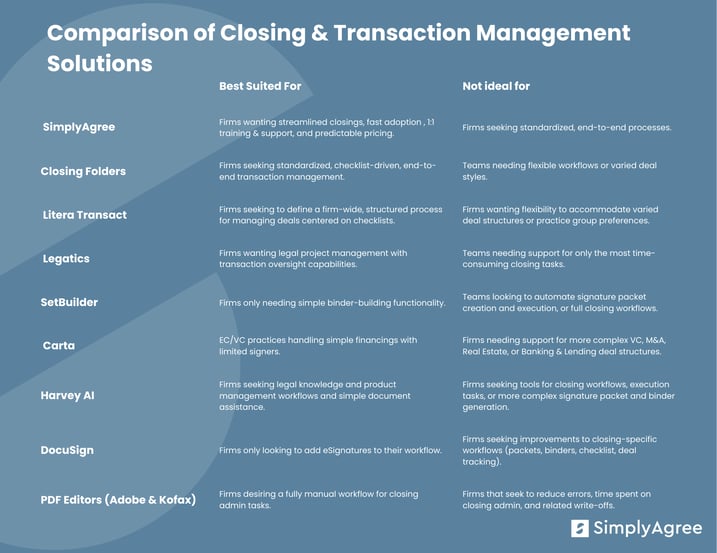
.png?width=819&height=633&name=Competitive%20landscape%20blog%20tables%20(1).png)
Option 1: Traditional Manual Approaches (Do Nothing)
Many firms still rely on traditional methods: emailing signature pages, manually tracking status in spreadsheets, compiling binders by hand, and using basic tools like PDF editors and DocuSign. This approach requires minimal technical change but can become time-intensive as deal volume or complexity grows. And the hidden cost is substantial — these administrative hours are often written off, turning hours of required effort into lost revenue.
PDF Editors
PDF editors, such as Adobe Acrobat and Kofax, are general-purpose tools for creating, editing, managing, and sharing PDF documents, often including eSigning capabilities. These platforms are widely used across industries and functions, including legal transactions, to handle document review, annotation, and execution, but they are not specifically designed to manage the closing process. This is what we refer to as a manual workflow — a closing process built from individual, disconnected steps teams must manage themselves.
In practice, this means teams often end up doing a lot of hands-on work: splitting up large documents to pull out signature pages, creating separate packets for each signer, emailing those packets back and forth, tracking signatures in spreadsheets, and then piecing everything together again to make a final closing binder. It's a time-consuming and error-prone process that varies from deal to deal. Because of this, firms frequently pair PDF editors with tools like DocuSign or rely on other manual steps to fill the gaps, depending heavily on internal processes to keep the closing on track and ensure nothing gets missed.
Supported Practice Groups
General-purpose tool; no specific practice group alignment.
Integrations
Adobe Acrobat and Kofax offer limited compatibility with certain document management systems (DMS). Adobe Acrobat can connect with iManage Work through the iManage Work Desktop for Windows integration, allowing users to open and save PDFs directly from the DMS. Similarly Kofax integrates with NetDocuments via the ndOffice connector, which enables users to open, edit, and save files back to the DMS.
However, these connections are limited to basic file handling. While the PDF editor combined with a DMS connection allows users to edit documents and keep them stored and organized, all closing tasks — pulling signature pages, creating packets, sending documents to signers, tracking signatures, and assembling the final binder — still fall entirely on the team
Pricing
Seat-license-based; vendors offer a range of plans depending on the number of users and features selected.
Training and Adoption Support
Vendors like Adobe and Kofax offer general onboarding resources—such as webinars, tutorials, and documentation—to help users manage PDFs. However, these tools aren’t designed for legal closing management, and their training only covers basic software use. They don’t provide 1-on-1 training or dedicated customer support, so any learning or troubleshooting typically involves minimal interaction with the vendor. Because of this, firms have to create their own internal workflows and support systems to handle complex, multi-step closings and ensure consistency across deal teams.
Support for Learning and Troubleshooting
Support includes standard help lines, online documentation, community forums, and phone or email assistance. While these resources cover the core functionality of creating, editing, and signing PDFs, they are not tailored for legal closings, and firms may need to rely on internal teams or third-party guidance to manage full closing workflows effectively.
DocuSign
DocuSign is an eSignature and agreement management platform designed for a wide range of industries and use cases. The platform provides tools for electronic signing, notary services, and agreement generation, with a recent expansion into commercial real estate closings. While widely recognized and trusted in the legal industry, DocuSign is not a dedicated closing solution—firms handling manual closings must pair it with PDF editors, text editors, or spreadsheets, and all core tasks (pulling signature pages, creating packets, sending documents to signers, tracking signatures, and assembling the final binder) remain the responsibility of the deal team.
Supported Practice Groups
Any practice that relies on eSignatures.
Integrations
DocuSign has a native NetDocuments integration but no native integration with iManage.
Pricing
Seat-license-based; DocuSign offers multiple plans depending on the number of users and features selected.
DocuSign Training and Adoption Support
DocuSign provides onboarding resources, including live and recorded webinars, product documentation, and self-guided tutorials to help firms implement eSignature workflows. Training is generally broad and geared toward enabling users to manage standard signature processes efficiently, but the platform does not provide dedicated support or structured onboarding for complex legal closings. Adoption can be straightforward for firms focused primarily on simple signature collection, like one-off agreements, though integrating DocuSign into more comprehensive closing processes often requires additional tools and manual workflows.
DocuSign Support for Learning and Troubleshooting
Ongoing support includes access to a global Help Center, email and phone assistance, and online resources covering eSignature, agreement creation, and notary functions. While support is robust for standard eSignature workflows, DocuSign lacks specialized guidance for end-to-end closing management or workflow troubleshooting in legal transactions. As a result, firms may need to rely on internal teams or supplementary tools to manage complex closing processes effectively.
Option 2: Build Your Own (Do Not Recommend)
Homegrown or Custom Built Tools
Some firms choose to build homegrown or custom transaction management tools tailored to their specific workflows. While these solutions can offer a high degree of customization, we generally do not recommend them. They often require substantial time, money, and internal resources to develop, maintain, and scale, while still lacking end-to-end features, robust integrations, or dedicated support. Most firms find that purpose-built closing management platforms are more efficient, reliable, and cost-effective.
Option 3: Assembling Workflows From General-Purpose and AI Tools
A growing number of firms are creating makeshift workflows using a combination of tools like PDF editors, DocuSign, or newer AI-enabled platforms. This can offer incremental improvement but often introduces manual steps, fragmented processes, and limited scalability across teams.
Carta
Carta is an equity and fund management platform designed for startups, investors, and private equity and venture capital firms. While primarily known for cap table and fund management, Carta has recently introduced a native closing tool aimed at supporting simple VC financings.
The platform allows deal teams to manage equity-related transactions, handle signatory changes, and execute small-scale financings within a single interface. However, because the closing functionality is new, Carta is best suited for simpler transactions with a small number of signers and does not support more complex VC, M&A, Real Estate, or Banking & Lending deal structures.
Carta’s closing workflow does not currently integrate with widely used eSignature platforms such as DocuSign, meaning firms may need to rely on Carta’s native signing tool or perform manual steps to manage complex signature workflows. This tool is best suited for EC/VC practices that want to manage simple financings with limited signers and do not require integration with existing eSignature tools.
Primary Supported Deal Types
VC and private equity financings — particularly small-scale deals with few signers, straightforward cap table changes, and limited workflow complexity.
Integrations
Native signing tool; does not integrate with DocuSign.
Pricing
Seat licenses; pricing varies based on number of users and complexity of portfolios.
Carta Training and Adoption Support
Carta provides guided onboarding and support primarily focused on its core equity and fund management tools. Resources include live and recorded webinars, documentation, and access to a dedicated customer success team. Because its closing tool is new, publicly available guidance on structured, role-based training or phased rollout for complex deals is limited. Firms adopting Carta for closing may need to develop internal champions and custom processes to ensure adoption and consistency.
Carta Support for Learning and Troubleshooting
Ongoing support includes access to a customer success team, documentation, and webinars. Support is centralized across the Carta platform, and while adequate for basic equity management and simple financings, firms may encounter limitations for complex closings with many signers or dynamic cap table changes. In such cases, supplemental workflows or manual processes may be necessary to complete all closing tasks.
By combining available onboarding resources, customer support, and internal processes, Carta can support small-scale EC/VC closings, though firms with high-volume or complex financing practices may find its capabilities limiting compared with dedicated legal closing platforms.
Harvey AI
Harvey AI is a legal project management platform designed to support firm-facing and client-facing workflows, with a focus on knowledge management, innovation, and administrative efficiency. While the platform has gained attention due to its use of AI and high-profile funding rounds, its capabilities are centered around virtual assistant functionality and managing internal legal knowledge rather than full-scale transaction closings.
Harvey AI enables teams to automate certain administrative and project management tasks, such as generating signature pages or supporting document creation. However, it does not provide end-to closing management or a dedicated transaction management solution, including signature packet compilation, distribution, or closing binder creation. Its AI-driven approach can require substantial adoption and adaptation of firm processes, and the tool is best suited for teams that are aligned on workflows and willing to engage with AI-powered models to support their operations.
Harvey AI may work for firms that want to augment internal knowledge management and project support, but may be limited for firms seeking a dedicated solution to streamline the full closing process.
Primary Supported Deal Types
Primarily legal knowledge and project management workflows; can assist with small-scale document generation or signature page creation, but not full transaction or closing management.
Integrations
Centralized platform with AI-driven tools; no specific integrations for DocuSign, iManage, or NetDocuments published publicly.
Pricing
Seat licenses; pricing varies based on the number of users and firm adoption requirements.
Harvey AI Training and Adoption Support
Harvey AI offers guided onboarding and access to support teams focused on helping innovation teams configure AI models and adopt platform workflows. Training resources include live and recorded demos, documentation, and limited tutorials. Because the tool relies heavily on AI and may require substantial changes to existing processes, adoption can be slower and requires alignment and active engagement from deal teams to tailor AI models to firm-specific needs.
Harvey AI Support for Learning and Troubleshooting
Support includes access to customer success teams, documentation, and online resources. While the platform can automate certain administrative tasks, it currently lacks comprehensive end-to-end closing functionality. Firms may need to implement supplemental workflows to manage signature packet creation, binder assembly, and other core closing activities.
By combining AI-driven assistance with centralized guidance, Harvey AI can support internal project management and knowledge workflows, but firms seeking full-featured, dedicated transaction or closing solutions may find the platform insufficient for their needs.
Option 4: Adopting a Dedicated Closing Management Platform
Some firms adopt software specifically designed for closing management, offering integrated tools for signature packets, eSignature, and closing binders. These platforms vary in scope and complexity, but generally aim to centralize and automate the core steps of the closing process
SimplyAgree
SimplyAgree is a closing management platform designed to simplify and automate the administrative work of signing and closing legal transactions. The platform is used by transactional attorneys to streamline closings, reduce write-offs, and improve the client experience.
At its core, SimplyAgree enables deal teams to create signature packets, collect signatures for transaction documents, compile those signatures back into their originals, and generate complete, organized closing binders—all within a single, intuitive interface. The platform was purpose-built to mirror existing workflows, allowing firms to automate time-consuming tasks without requiring attorneys or staff to change how they work.
SimplyAgree integrates directly with widely used tools such as DocuSign, iManage, and NetDocuments, enabling users to sync documents, track progress, and maintain version control seamlessly within their established document environments. It supports a wide range of transactional practice areas, including M&A, Real Estate, Finance, and Venture Capital, offering flexibility to accommodate varying deal styles and team preferences.
With unlimited users and transactions under a flat annual fee, SimplyAgree provides predictable pricing and fast time-to-value for firms of all sizes. Its focused design and responsive support make it a scalable solution for firms seeking to modernize their closing process while maintaining consistency, accuracy, and control across deal teams.
SimplyAgree is best suited for firms that want to modernize their closing workflows without adopting a full end-to-end transaction management system, offering a practical balance between flexibility, efficiency, and firm-wide oversight.
Primary Supported Deal Types
Banking & Lending, VC, Real Estate, M&A — well-suited for transactional teams needing fast, flexible, and reliable document compilation, signature collection, and closing binder creation, particularly for deals with a large number of signatories or complex document sets.
Integrations
iManage & NetDocuments (DMS) and DocuSign (e-signature)
Pricing
Unlimited annual subscription; covers all users and transactions under a flat fee.
SimplyAgree Training and Adoption Support
SimplyAgree emphasizes personalized, hands-on onboarding for every firm. Training options include in-person or virtual group sessions, one-on-one demos, and guided walkthroughs, ensuring each practice group understands how to use the platform within their existing workflows. Because the platform is designed to align closely with existing workflows, firms can begin setup in the morning and have attorneys actively using the tool and realizing value by the afternoon. This combination of personalized guidance, practical training, and fast time-to-value helps accelerate firm-wide adoption while minimizing disruption.
While adoption is designed to be straightforward, firms that engage proactively with training and internal champions tend to achieve the fastest and broadest uptake.
SimplyAgree Support for Learning and Troubleshooting
Ongoing support is a key differentiator. Firms have access to a responsive support team ready to provide live transaction guidance whenever users need it, including hands-on assistance during active deals, workflow troubleshooting, and best-practice recommendations. Alongside live support, users can leverage tutorials, documentation, and self-paced resources to reinforce learning.
By combining personalized onboarding, live transaction guidance, and responsive support, SimplyAgree helps firms achieve consistent adoption, improved efficiency, and reliable accuracy across deal teams. Because the platform is designed to align closely with existing workflows, firms report rapid time-to-value and high satisfaction with the customer success experience, making the platform easy to adopt while still accommodating varied deal styles and team preferences.
iManage Closing Folders
Closing Folders is a transaction management platform developed to help law firms manage the organization of documents, e-signatures, and closing checklists for complex transactions. At its core, the platform is designed around the concept of a digital closing checklist—transforming what has traditionally been a static Word or Excel document into a dynamic, interactive workflow. This digital checklist connects directly with deal documents, tracks signature statuses in real time, and enables multiple parties to collaborate within a single shared environment.
A key part of Closing Folders’ appeal is its deep integration with the iManage document management system (DMS). For firms already using iManage, the platform is often positioned as a low-cost add-on to their existing subscription. This makes it an attractive option for firms seeking an end-to-end transaction management solution that fits neatly within their established document ecosystem. The platform has also gained significant adoption within the Canadian legal market and has been implemented by several large U.S. firms with high-volume transactional practices.
Because of its checklist-oriented design, Closing Folders is often best suited for deal teams that want to standardize and centralize their entire closing process. Its structured workflows and collaborative features can be a strong fit for firms where all participants—from partners to support staff—are fully aligned on introducing and adhering to a uniform closing process.
However, firms that prefer more flexibility to accommodate varied deal styles or practice group workflows may find Closing Folders’ process rigidity challenging. Since its value comes from driving consistency through a single, shared checklist model, it can require a higher degree of buy-in across all deal participants to realize its full benefits. Similarly, firms focused primarily on specific closing tasks—such as signature packet generation, signature collection, or closing book creation—may find that its broader transaction-management scope introduces workflows or setup requirements that extend beyond their immediate needs.
Primary Supported Deal Types
Primarily M&A — for teams seeking full workflow standardization and centralized closing tracking, especially in high-volume or highly structured transactions.
Integrations
iManage (DMS) and DocuSign (e-signature) — strong synergy for firms already embedded in iManage; leverages DMS features for document storage and version control.
Pricing
Base pricing covers a limited set of monthly users, with costs increasing for additional seats; pricing varies by firm size and user count. May be less predictable for firms with fluctuating deal volumes.
Closing Folders Training and Adoption Support
iManage Closing Folders provides a structured onboarding framework supported by training resources and internal enablement guidance. The company encourages firms to identify internal champions, incorporate Closing Folders into attorney onboarding programs, and promote adoption through recurring practice group sessions and ongoing education. Training is delivered through a combination of live onboarding sessions, scheduled webinars, and self-paced resources available within the iManage Help Center. Firms are also supported with best-practice materials that outline strategies for building engagement and maintaining consistent platform use across teams. This approach emphasizes firm-led adoption, reinforced by continued access to iManage’s customer success and product teams. However, because the program relies heavily on internal champions and self-directed participation, adoption outcomes may depend on how proactively each firm drives engagement. Additionally, iManage has not published detailed role-based training tiers or phased implementation models, which may make it less prescriptive for firms seeking a more defined rollout structure.
Closing Folders Support for Learning and Troubleshooting
Closing Folders is supported through iManage’s centralized global support infrastructure, which serves the full iManage product suite. Users can access a dedicated Help Center with written guides, knowledge articles, and video walkthroughs, as well as community resources and monthly webinars. Support requests can be submitted through the iManage Customer Center, by email, or by phone, with live agent assistance available for extended hours each day. For firms that require faster or more comprehensive response coverage, iManage offers premium care tiers that include 24/7 support for priority issues. Because support is unified across all iManage products, Closing Folders users benefit from shared technical expertise and consistent access to the company’s global resources. However, this centralized structure may also mean that product-specific issues take longer to triage or resolve, particularly for firms without premium support coverage. Response times and troubleshooting depth may vary depending on contract level and the complexity of the issue, which firms should consider when evaluating support expectations and service-level agreements.
Litera Transact
Litera Transact is a full transaction management platform built to streamline every stage of the closing process—from creating checklists and organizing documents to collecting signatures and generating closing binders. It’s part of the broader Litera suite of legal technology tools, making it one of the most recognized providers in the legal tech space.
At the center of Transact’s design is its digital closing checklist, which serves as the central hub for each deal. Every task, deliverable, and signature requirement lives on that checklist and updates dynamically as documents are executed or marked complete. This structure provides real-time visibility for all parties—internal and external—while keeping the entire transaction process organized within a single system. Transact is designed for end-to-end management rather than just the closing stage of a deal.
Litera Transact often appeals to large and mid-sized firms that want to standardize their transaction workflows and implement a single, firm-wide process for managing deals from drafting through execution, particularly those already invested in Litera’s ecosystem. However, firms seeking more flexibility to accommodate varied deal styles or practice group preferences may find its structured approach less adaptable. Because the platform functions best when all participants work within its dedicated system, it can also require significant change management to achieve full adoption and realize its potential benefits.
Primary Supported Deal Types
VC practices — suitable for firms looking to standardize full transaction workflows from drafting through execution, particularly for multi-team or cross-department deals.
Integrations
iManage & NetDocuments (DMS) and DocuSign (e-signature) — enables firms to maintain documents within their DMS while managing signatures and workflow centrally.
Pricing
Transaction-based; upfront cost for a set number of transactions, with additional fees if limits are exceeded. Effective use may require forecasting and attorney discretion during high-volume periods to manage costs efficiently.
Litera Transact Training and Adoption Support
Litera Transact’s approach to training and adoption is highly structured and methodical, mirroring a full-scale change management process. The company’s Transaction Advisor and Strategic Growth Consultant teams partner with firms to move through four defined stages—Launch, Learn, Adopt, and Measure—ensuring each practice group gains both technical know-how and buy-in. Training is delivered at multiple levels: standard sessions introduce the platform’s core deal management tools, while advanced, technical, and expert tiers train department specialists, IT teams, and internal trainers to manage more complex use cases. A “champion” network supports peer-to-peer advocacy, helping build momentum and confidence within each department. This multi-tiered approach ensures that every stakeholder—from associate to innovation lead—receives relevant training. However, its depth can also make rollout more time-intensive, particularly for smaller firms that may prefer faster, self-guided onboarding or lack the bandwidth for a phased, role based implementation.
Litera Transact Support for Learning and Troubleshooting
Beyond formal training, Litera Transact offers extensive ongoing support to help users learn, troubleshoot, and stay engaged. Each firm has access to Transaction Advisors who provide live deal support, kick-off workshops, and check-ins to guide teams through their first transactions. Built-in resources like “Getting Started” and “Walkthrough” guides, video tutorials, and e-learning modules allow users to refresh skills or learn independently.
For technical issues or deeper configuration needs, Litera operates a centralized Customer Center where users submit tickets for all products in the Litera suite. From there, requests are triaged by a general support team and routed to product-specific specialists, such as the dedicated Litera Transact Support Team or Workflow Solutions Consultants who focus on transaction workflows. This hybrid model allows Litera to leverage cross-product knowledge while still maintaining subject-matter expertise for complex Transact-related issues. However, because Litera supports a large and growing portfolio of products, response times may vary depending on ticket priority and routing efficiency—smaller firms or lower-tier clients could experience longer waits for non-urgent issues compared to those with premium support arrangements.
Champions and power users also play an important role in bridging day-to-day questions internally, while IT teams trained under Litera’s technical modules can handle first-line troubleshooting before escalating to Litera’s engineers. Together, these layers of self-service, internal expertise, and external support aim to make adoption sustainable and reduce friction for users—but they also depend on clear communication and active engagement between firm-side teams and Litera’s advisors to keep response times and issue resolution consistent.
Legatics
Legatics is a UK-based legal project management platform built to support both firm-facing and client-facing workflows. Founded in 2015, it has become a well-established tool in the UK market and has recently expanded into the U.S. with a focus on transaction management.
Legatics approaches signing and closing through a checklist-oriented, project management lens, where firms manage the entire deal within the platform. Its comprehensive reporting capabilities make it appealing for partners and knowledge management teams looking to track activity across multiple matters.
That said, its template-based framework can introduce rigidity for deal teams with unique closing structures or formatting requirements. While its newer closing features reflect a growing investment in the transactional space, Legatics remains most aligned with firms seeking a broader legal project management solution rather than a dedicated closing workflow tool.
Primary Supported Deal Types
M&A — also adaptable for teams managing multi-party transactions with detailed reporting requirements; useful for firms seeking both project and deal-level visibility.
Integrations
iManage (DMS) and DocuSign (e-signature) — supports document storage and signature management within existing infrastructure.
Pricing
Transaction-based; upfront cost per set number of transactions, with extra fees if limits are exceeded. Flexible for smaller firms but may scale less predictably with larger deal volumes.
Legatics Training and Adoption Support
Legatics takes a structured but flexible approach to training and adoption, emphasizing guided onboarding and firm enablement over standardized tiers. Each firm is supported through a customer onboarding process that includes planning, implementation, and access to an “Onboarding Resources Pack” containing training checklists, template presentations, and internal communication materials. Legatics also provides real-time usage analytics through its Admin System, allowing firms to track adoption internally and identify areas for additional engagement. The company’s materials encourage firms to involve stakeholders early, build internal champions, and tailor training to specific user groups to ensure lasting adoption. While Legatics provides a strong framework and self-service resources, publicly available information does not outline distinct role-based training levels or detailed phase-based rollout structures, meaning firms may need to define their own internal training cadence and accountability measures.
Legatics Support for Learning and Troubleshooting
Legatics offers a range of support and learning resources designed to help users maintain confidence and efficiency once the platform is live. The company provides a dedicated Help Center with written guides, knowledge articles, and “Getting Started” videos, alongside live and on-demand webinars covering both introductory and advanced use cases. Its customer success team assists firms during onboarding and continues to provide guidance to encourage ongoing usage and adoption. While Legatics highlights an active customer success function, it does not publicly specify whether individualized support or firm-specific training is included as part of its standard service, nor does it publish defined service-level response times. Overall, Legatics combines proactive customer success engagement with accessible self-guided learning materials, though the extent and format of direct support may vary depending on each firm’s implementation and engagement with the Legatics team.
SetBuilder
SetBuilder is a closing set builder tool offered by NetDocuments as part of its broader transaction management suite. It enables users to organize documents, compile closing sets, and generate binders directly within their existing NetDocuments workspace.
Offered as a free add-on, SetBuilder focuses exclusively on the closing binder stage of the transaction process. It does not include tools for creating or managing signature packets, tracking signatures, or managing closing checklists, so users often supplement it with other solutions or the full NetDocuments transaction management platform.
SetBuilder’s integration within NetDocuments offers convenience for firms already using the DMS, allowing seamless access to documents and prior closing sets. However, its limited functionality means it serves primarily as a binder-building utility rather than a comprehensive closing management platform, making it best suited for deal teams seeking a lightweight solution focused on document compilation rather than full closing execution.
Primary Supported Deal Types
Banking & Lending, M&A, Real Estate — suitable for teams needing lightweight binder-building functionality without full transaction workflow management.
Integrations
NetDocuments (DMS) and DocuSign (e-signature) — leverages existing NetDocuments workspaces for document compilation.
Pricing
Free add-on — included with NetDocuments; no per-user or per-transaction fees, but lacks full transaction management functionality.
SetBuilder Training and Adoption Support
SetBuilder, part of the NetDocuments ecosystem, takes a streamlined approach to training and adoption that builds on users’ existing familiarity with the broader NetDocuments platform. Training resources focus primarily on helping users integrate SetBuilder into established document management workflows, emphasizing consistency and efficiency over formal change management. Available resources include webinar-based demonstrations, product brochures, and FAQ materials that outline how to create, organize, and export document sets. This lightweight model makes adoption straightforward for existing NetDocuments users, but it also means there is limited public evidence of structured, role-based training programs or phased onboarding support. There are no published frameworks for tracking usage, measuring adoption, or tailoring training to different user groups. As a result, while firms benefit from a short learning curve, they may also need to self-manage engagement and training continuity to ensure consistent platform usage across teams.
SetBuilder Support for Learning and Troubleshooting
Support for SetBuilder is delivered through NetDocuments’ centralized customer success and technical support channels, rather than through a dedicated SetBuilder-specific help desk. Users have access to product FAQs, online documentation, and recorded webinars, which cover most day-to-day learning and troubleshooting needs. This shared support structure offers continuity across the NetDocuments suite but may also present challenges for firms requiring specialized or time-sensitive assistance—particularly if SetBuilder-related inquiries compete with higher-volume requests for NetDocuments’ core DMS products. Public materials do not outline defined service levels, response-time guarantees, or access to product-specific experts for SetBuilder. Consequently, while users benefit from a robust self-service ecosystem and a mature global support network, firms seeking deeper, workflow-specific troubleshooting or one-on-one adoption guidance may find the available resources more general than tailored.
How Firms Can Evaluate Their Next Steps
After evaluating the various solutions and leading tools in the market, firms often ask what comes next. The following framework outlines how to assess your current workflows, explore solutions, and drive adoption effectively.
Assessing Current Pain Points
The most effective evaluations start with listening. Begin by clarifying what your attorneys and staff truly need from a closing solution. Are they looking for support across the entire closing workflow—from checklists and document tracking to final execution—or simply a tool to streamline the most time-consuming administrative steps like assembling signature packets and closing binders?
Engaging deal teams and associates early in the process helps uncover where the biggest friction points lie—and firms that involve end users from the start typically experience faster adoption and stronger long-term engagement. Whether the challenge is oversight, version control, or the manual work that happens in the final hours of closing, identifying these needs early ensures the solution you choose delivers measurable value from day one.
Understanding Adoption and Training Needs
Adoption success often depends as much on training and support as on the product itself. Consider what level of onboarding assistance your firm will need: how much time and internal resource can be dedicated to setup, training, and change management? Would your team prefer to manage those efforts internally, or benefit from a vendor that takes a more hands-on role in guiding adoption?
It’s also worth assessing how intuitive a tool feels from day one. Some platforms require firm-wide rollout and structured training to achieve consistent use, while others are designed for gradual, team-by-team adoption with minimal lift. Clarifying these preferences early helps ensure a smoother implementation and faster path to measurable ROI.
Polling Peers and Benchmarking
Connecting with peers at other firms is one of the most valuable ways to benchmark your firm’s current state and possible next steps. Polling colleagues in similar practice groups can reveal what’s working across the market—what tools others implemented, how adoption spread, and where they’ve seen measurable gains in efficiency and realization.
Those peer insights often help firm leaders set realistic goals and avoid overcomplicated technology paths that promise transformation but underdeliver in daily use.
Evaluating Through Pilots and Trials
Evaluating potential solutions through a limited pilot or trial can help firms understand how well a tool aligns with existing workflows and user preferences. Pilots offer practical insight into how attorneys and staff engage with the platform, how easily it integrates into daily deal work, and where it supports or challenges current processes.
They also provide an opportunity to assess the level of collaboration and support from the vendor during setup, training, and live transactions. Early user feedback from these pilots can clarify whether the tool balances automation with flexibility, fits naturally into existing practices, and supports a scalable rollout plan for long-term adoption.